
A clean cut can make a card feel finished. A crooked one can make a whole stack look wrong. I would choose a paper cutter by the paper on my desk, the size of the cut, and how often I need to make it.
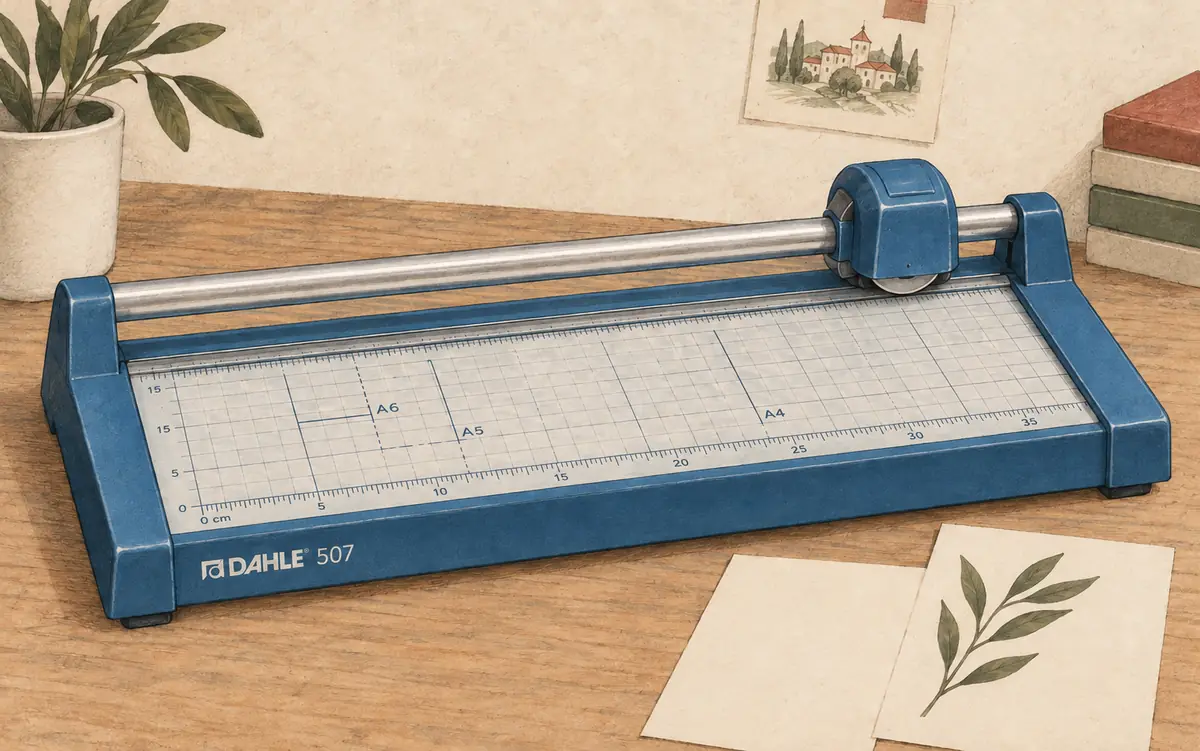
For a home art desk, my first pick is the Dahle 507. The Swingline ClassicCut Lite suits quick cuts in office paper. The Rotatrim Pro12 is the one I would consider for frequent work with a wider range of materials. All three are manual tools. Each has a clear limit.
Paper cutter comparison: three tools I would shortlist
| Paper cutter | Best fit and main limit |
|---|---|
| Dahle 507 | Small art projects; rated for up to 7 sheets |
| Swingline ClassicCut Lite 12-inch | Everyday documents; guard limits the recommended paper size |
| Rotatrim Pro12 | Frequent studio work; takes more desk space |
Sheet counts are the makers' ratings for the stated paper, not a promise for thick card. A stack of copy paper and a stack of watercolor paper are very different loads.
1. Dahle 507: my pick for a small creative desk
The Dahle 507 has a 12-inch cutting length, an enclosed rotary blade, and a clamp that holds paper as you cut. Dahle rates it for up to seven sheets. Its metal base is about 17.25 by 8.13 inches.
That makes it a sensible size for trimming prints, swatch cards, and small paper pieces. I like the narrow base for a desk that also needs room for a sketchbook. The enclosed cutting head is another useful feature, though fingers still need to stay away from the cut.
The limit is workload. Seven thin sheets is a small stack. I would buy this for careful, modest jobs, not for trimming a thick book block. For heavy card, start with one sheet and check the manual's material limits.
It also makes sense beside a set of Ohuhu markers. Cut spare paper into small swatch cards, then keep them with the pens. Small, repeatable cuts are a better reason to buy this tool than an urge to fill a shelf.
2. Swingline ClassicCut Lite: for everyday paper cuts
The 12-inch Swingline ClassicCut Lite uses a hinged cutting arm. It has a light plastic base, a printed grid, non-slip feet, a fixed guard, and a latch for storage. The maker rates it for ten sheets of 20-pound paper.
I would choose it for trimming letters, handouts, and paper inserts. A guillotine can make a quick straight cut once the paper sits square against the guide. The motion is simple, but the setup still matters.
Here is the detail I would check twice: Swingline recommends a maximum paper size of 8.5 by 11 inches because of the guard rail. The 12-inch blade does not mean every 12-inch craft sheet will fit well. Do not remove the guard to make a sheet fit.
The handle arrives detached and needs to be fitted as the instructions show. Leave enough clear space for the arm to move. Close and latch it after use.
3. Rotatrim Pro12: for frequent studio work
The Rotatrim Pro12 pairs a 12-inch cut with twin steel guide rails, a thick baseboard, and a clear clamp strip. Its metal head runs along those rails. The maker lists a maximum thickness of 3 mm for suitable flexible materials.
I would consider it for regular print trimming and small studio projects. The twin rails help keep the head from twisting. A clear clamp strip also lets you see the edge of the sheet as you place it.
Size is the trade-off. At about 18.5 by 15.75 inches, the base takes much more room than the Dahle. It weighs 5.2 kg, roughly 11.5 pounds. This is a tool I would give a steady place on the desk.
Do not turn the 3 mm figure into a guessed sheet count. Material stiffness matters too. Check the maker's material list and cutting and care instructions for the exact job. US shoppers should confirm the model, local seller, and support terms before ordering.
Rotary paper trimmer or guillotine?
A rotary paper trimmer uses a round blade that moves along a rail. A guillotine paper cutter uses a long hinged blade that comes down beside the base. Both can cut straight lines. Neither can fix paper that slips out of place.
I prefer the rotary format for a small art desk because the cutting head follows a set track. A guillotine can suit quick office work. For large stacks, a print shop may need a stack cutter or an electric machine with a clamp. That is a different purchase from these desktop paper cutters.
Real craft users disagree about which style feels easier. In this card-making discussion, some users favor a sliding trimmer, while others like a guillotine for card bases. Several mention keeping sheets square and replacing worn blades. I would treat hand control and paper hold as part of the buying choice.
What a paper cutter helps you do
A paper cutter saves time when you need the same clean edge on many sheets. Scissors suit a curve. A flat base and clear measurement guides help a paper cutter make precise cuts with even margins.
At home, that may mean photo prints, scrapbook pages, or card stock. In an office, manual cutters help trim handouts and slides printed for a meeting. Teachers use paper cutters for worksheets and art supplies. Small businesses use cutters for flyers, invoices, and folded brochures.
For a photo portfolio, I would check the border width on all sides. For scrapbooking, I would test the cutter on the thickest stock first. Accurate cuts come from the guide, the paper hold, and your care with the tool.
When automatic paper cutters make sense
Manual paper cutters let you set the sheet and control the cut by hand. They usually cost less than powered cutters meant for large paper stacks. A manual guillotine uses a long lever. A manual rotary trimmer moves a cutting head along a rail.
Automatic paper cutters use power for parts of the cutting process. Some electric models can store cut sequences and move the back gauge, the stop that sets the cut size. Busy print shops may need that speed for paper stacks and repeat orders.
I would not pay for an automatic machine to make a few cards. Compare the full cost, floor space, training, guards, and service needs before moving beyond a manual paper cutter. A higher price or more steel does not by itself promise a better cut.
What to check before you buy
Paper cutter width: measure the longest cut
A cutter needs enough cutting length for the edge you plan to trim. Measure the full sheet width before folding it. The cutting width must fit that edge. Also measure the space beside the cutter, where the rest of that sheet will sit.
Match the paper cutter to the material
Standard paper, thick stock, coatings, and texture change how a blade moves. A thin glossy print is not the same as rough card. Do not assume a tool made for paper can cut fabric, plastic, foam, or thick board unless its maker says so.
Check paper cutter parts and price
A low paper cutter price is only part of the cost. Find out whether you can buy a new blade, cutting strip, or clamp. Check the exact model number. Parts for a similar-looking trimmer may not fit.
Look for a safe place to work
Use a firm, level table with clear space around the tool. Keep hands behind the guard and away from the blade path. Follow the manual for cutting, cleaning, and blade changes. Store the cutter where children cannot reach it.
The cutting process: keep each cut square
Start with fewer sheets than the maximum. Place a straight paper edge against the guide, check both ends, and use the clamp as directed. Make one test cut before starting a batch.
If the edge looks rough, stop. Check the paper load, blade, and cutting strip. Forcing the tool can waste the sheet and strain the cutter. Keep wet glue and fresh paint away from the cutting bed.
That last point matters when you make painted cards. Let gouache paint dry before trimming a sheet, and use clean scrap to check the cut first.
Which paper cutter should you choose?
I would start with the Dahle 507 for small art and paper projects. Choose the Swingline for routine letter-size work. Consider the Rotatrim when a sturdy tool will earn its desk space through regular use.
Buy for the work you do most. A neat edge on one card is worth more than a high sheet count you never need.
Keep making.
Make a set of swatch cards for the paints in our gouache buying guide.